MapTrip 112 — GPS App For Fire Trucks and Police
MapTrip 112 is the perfect GPS app for fire trucks and police. Numerous functions such as emergeny routing and map editing have been specially developed for this operational scenario. MapTrip 112 can be connected to your control center and will drive routes as planned!

On the Fastest Route to the Incident
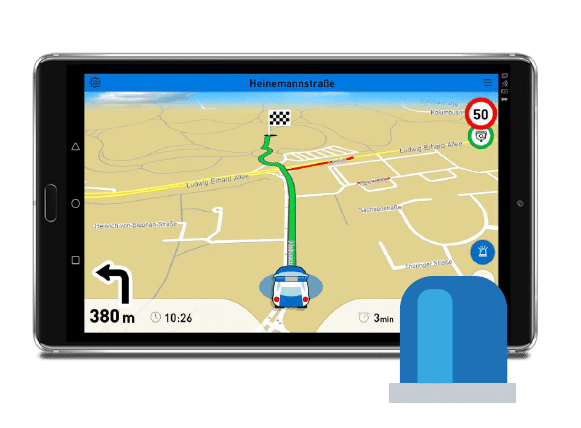
Emergency vehicles with blue lights drive differently than normal road users. Therefore, they also need a special navigation for firefighters and police, which takes this driving style into account and leads to the desired destination. On the last meters to the destination, emergency routing can be activated in MapTrip 112, the GPS app for fire trucks and police. Destinations that are located in a park or in a pedestrian zone are then approached on a direct route. The driving instructions will be adapted to the mission journey. Turning restrictions can be ignored. On the other hand, MapTrip 112 behaves like a normal GPS system on the way to the location.
Documentation and Tutorial

The full MTI documentation for developers can be found here. MTI is the abbreviation for MapTrip Interface. MTI is an easy-to-use Android interface that allows developers to control the MapTrip Truck GPS navigation app with just a few commands.

In our tutorial we will guide you step by step through the integration of the MapTrip Truck GPS navigation interface into your own application. After completing the tutorial, you will be able to integrate MapTrip GPS Navigation into your own Android app.

In this YouTube video we show you how to integrate our GPS navigation. On our YouTube Channel you will find numerous videos on development topics.

On Github you can find useful hints and examples.
Edit the Map
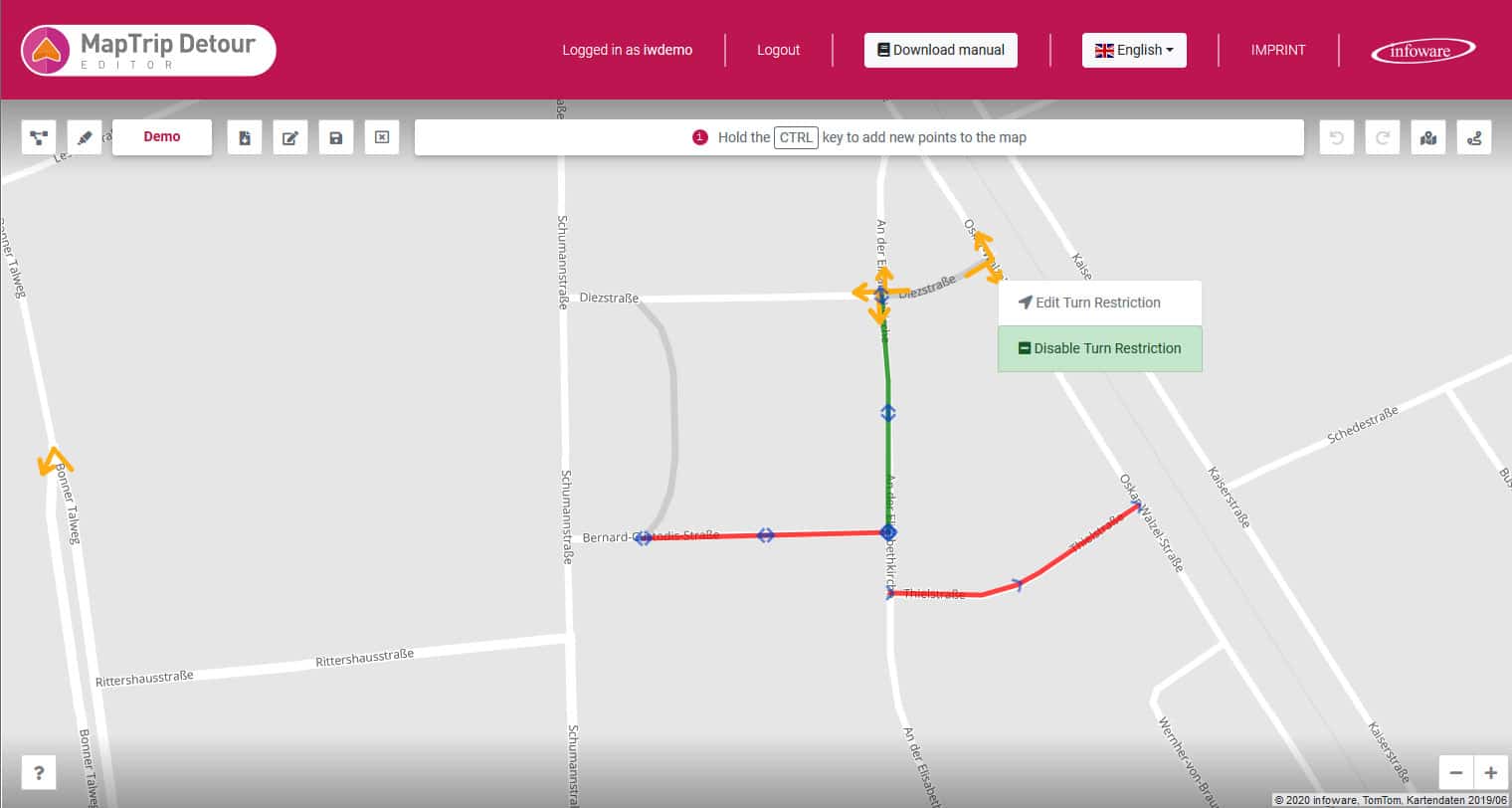
With the editor you can edit the navigation map yourself. Add closures where there are construction sites or where roads cannot be used by large vehicles. You can also remove closures so that your MapTrip 112 GPS App for Fire Trucks will drive on roads (e.g. pedestrian zones or bus lanes) that are closed to other road users. Finally, you can also remove turn restrictions so that your navigation can turn freely at the intersection.
Emergency GPS navigation with integrated water intake points through Wasserkarte.info
Integrate water intake points such as hydrants or a fire pond into the MapTrip 112 navigation. Thanks to the interface to Wasserkarte.info, it is possible to transfer the water intake points entered there into the MapTrip GPS navigation map. This way, the driver can see at a glance where water intake points are located along his route and retrieve all information relevant to the operation. GPS Navigation to water intake points is also integrated.
The instructions for the integration can be found in the link below.

Mit dem Laden des Videos akzeptieren Sie die Datenschutzerklärung von YouTube.
Mehr erfahren
Wasserkarte.info is a software for fire departments and municipalities, which allows to enter all data about water intake points independently in a map. These water points can now be displayed in the MapTrip 112 GPS navigation and the route guidance to them can be started.
Case Study Rosenbauer
Thomas Hartinger, Head of Operations Management at Rosenbauer International AG, explains the advantages of MapTrip 112 GPS App for Fire Trucks compared to standard solutions for navigation of emergency vehicles.
Read about how MapTrip 112 is a successful component of Rosenbauer's EMEREC software to help the emergency services.
Mit dem Laden des Videos akzeptieren Sie die Datenschutzerklärung von YouTube.
Mehr erfahren
Navigate Exactly as Planned
The route that the dispatcher in the control center sees must be the same as the route in the navigation app. This can be assured with MapTrip and the Server-API. Both use the same routing algorithm and the same map data. Synchronization features ensure that the route planned is identical to the route in the turn-by-turn gps navigation in the vehicle.
MapTrip 112 - GPS app for Fire Trucks and police - Test now!
Download MapTrip 112 now here for your Android device. We'll also give you access to the editor so you can record road works and road closures. The emergency routing is of course also included!
MapTrip 112 Knows all Roadblocks
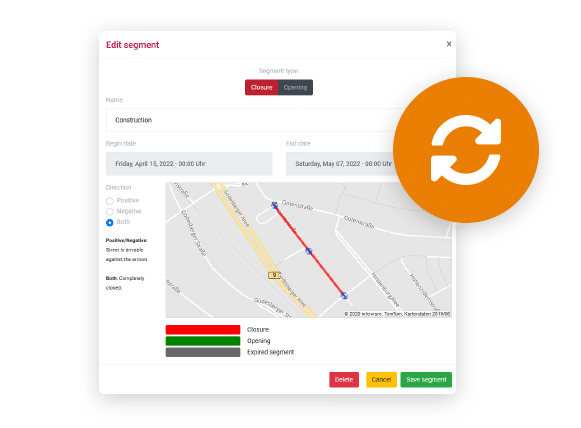
Automatically synchronize road works and road closures with GPS navigation
- Simple recording in the online-editor
- Road works are displayed and bypassed in the navigation system
- Open one-way streets
- Cancel turn prohibitions
Usecase: MapTrip 112 at the Fire Department Wuppertal
All vehicles of the Wuppertal fire department including fire engines and rescue services have MapTrip 112.
In the event of an emergency, the fire department must not only reliably arrive at the right place - but also do so as quickly as possible. Analog navigation with city maps has been replaced by digital navigation systems for this purpose. The Wuppertal Fire Department has found an individual solution for a navigation system that fully takes into account its special needs.

Article in Feuerwehr 2020-10 about the use of MapTrip at the fire department Wuppertal
Server Interface For Developers
No route planner knows your local area as well as you do. Even the most up-to-date maps from the most professional providers don't always know the best way to get to the location in your city. To help you tailor route planning to your exact needs, MapTrip Navigation also provides a Server-API. It allows developers to import local road network information into the navigation. This can be, for example, a directory of all road works that already exists in the control center. Alternatively, a web editor is available for manual editing of the maps.
The Server-API offers functions for calculating individual routes and distance matrices. This makes it very easy, for example, to determine and compare the travel time of several emergency vehicles to a location. In this way, you can determine the best vehicle and also immediately send the appropriate route from the control center to the navigation in the vehicle.
The Server-API also provides the ideal link between navigation and the control center. In this way, routes can be planned precisely in the control center and then sent directly to the navigation in the vehicle. Route planning takes into account any recorded changes to the map data, such as road works or preferred routing. The route can also be manually edited by the dispatcher in the control center before it is sent to the navigation system. The routes in the navigation then correspond 1:1 to those in the control center.
With the Detour functions, you can capture all your local know-how in the maps. You can mark faster routes based on experience as preferred routes using the Server-API. You can mark other roads where there is a high risk of delays as to be avoided. This way you can make sure that the navigation drives routes as good as an experienced driver with years of local knowledge.
Android Interface For Developers
The MapTrip app itself also has an interface to communicate with other Android apps. As a developer, you can use it e.g. to start the navigation, to define the dimensions of your vehicle or to query the calculated arrival time. Under our GitHub account you can find numerous demo programs that explain how to use the navigation interface.
Edit Truck Restrictions
Truck restrictions are stored in the map data of the truck navigation. They contain information such as the height of a tunnel, the maximum weight with which a bridge may be driven on or the width of a road. With the additional function “Detour” you can edit them yourself.
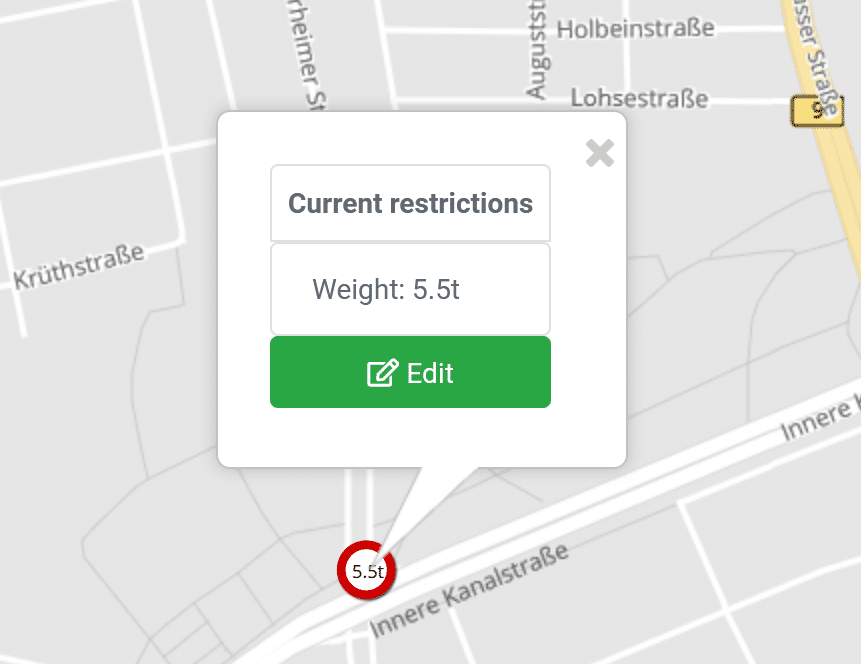
A missing truck restriction, e.g. a low tunnel, can be added in the Detour Editor with a few clicks. Existing truck restrictions can be changed or deleted completely. These functions are interesting for fire departments, for example, who do not have to adhere to the usual traffic rules during emergency trips. But these functions are also useful for other applications, e.g. in heavy goods traffic, e.g. to record the clearance width of a construction site. Truck restrictions can also be captured automatically via the MapTrip Server API.
Close / Open / Prioritize / Avoid Roads
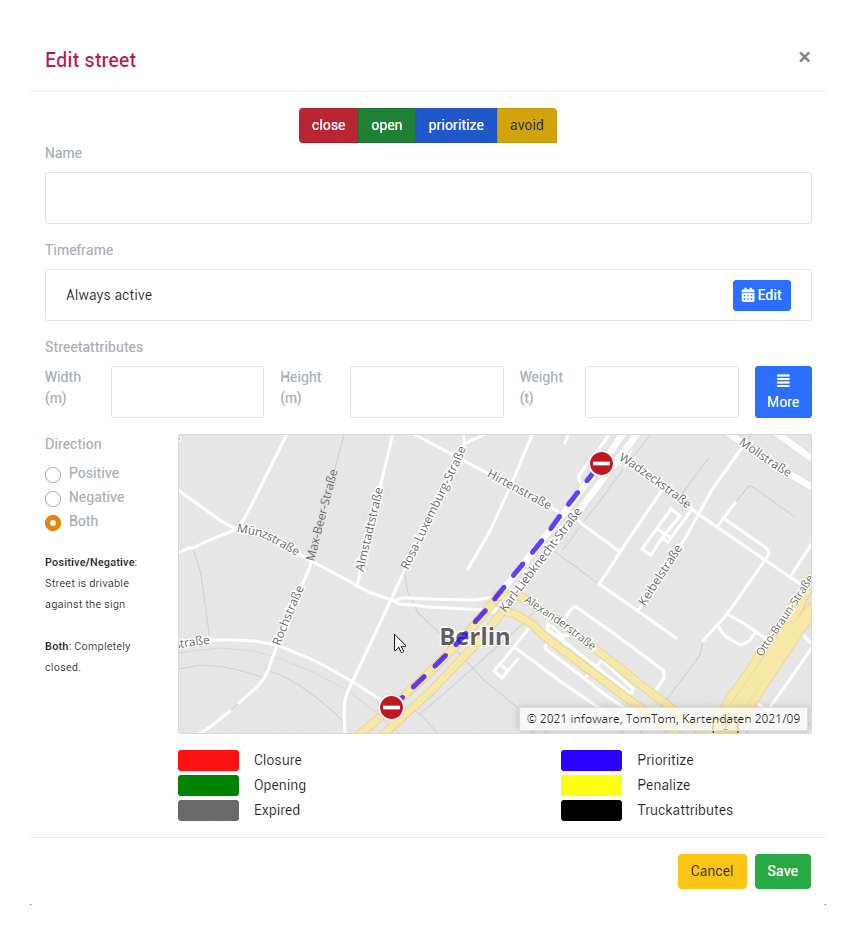
To optimally take local conditions into account in your navigation, you can close, open, prioritize or avoid roads. If a road is blocked by a construction site, it can be marked as closed for the duration of the work. A non-public road can be opened for the fire department and thus made usable for navigation. Roads that should be used preferentially are marked as prioritized and consequently used more frequently in route planning and navigation.
The functions for editing the street maps are available in the Detour editor. The application can be operated comfortably in the browser. An installation is not necessary. Editing is designed to be intuitive and simple. Changed roads are automatically synchronized with your MapTrip navigation software and are then taken into account by MapTrip even without an internet connection.
All road map editing functions are also available to developers with the Server-API. Via the Server-API, edited roads can also be imported automatically from other systems.
Emergency Routing
When emergency routing is activated, the GPS navigation ignores turning restrictions and can access one-way roads and pedestrian areas. This behaviour can be configured according to your individual preferences. A radius around the destination defines when the GPS navigation switches to emergency routing. Until then it will behave like a regular GPS navigation.
Emergency routing can be activated inside a definable radius around the destination.
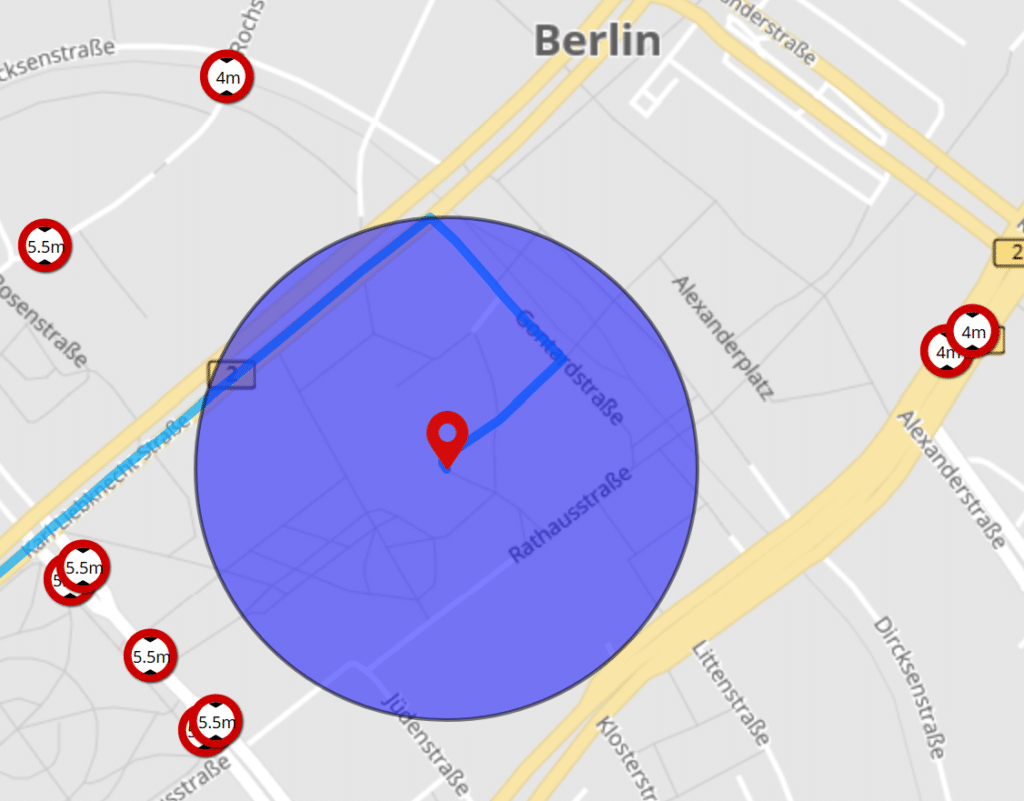
Inside the emergency routing radius
- turning restrictions are ignored
- one-way streets can be used both ways
- pedestrian areas can be used
- parks are accessible